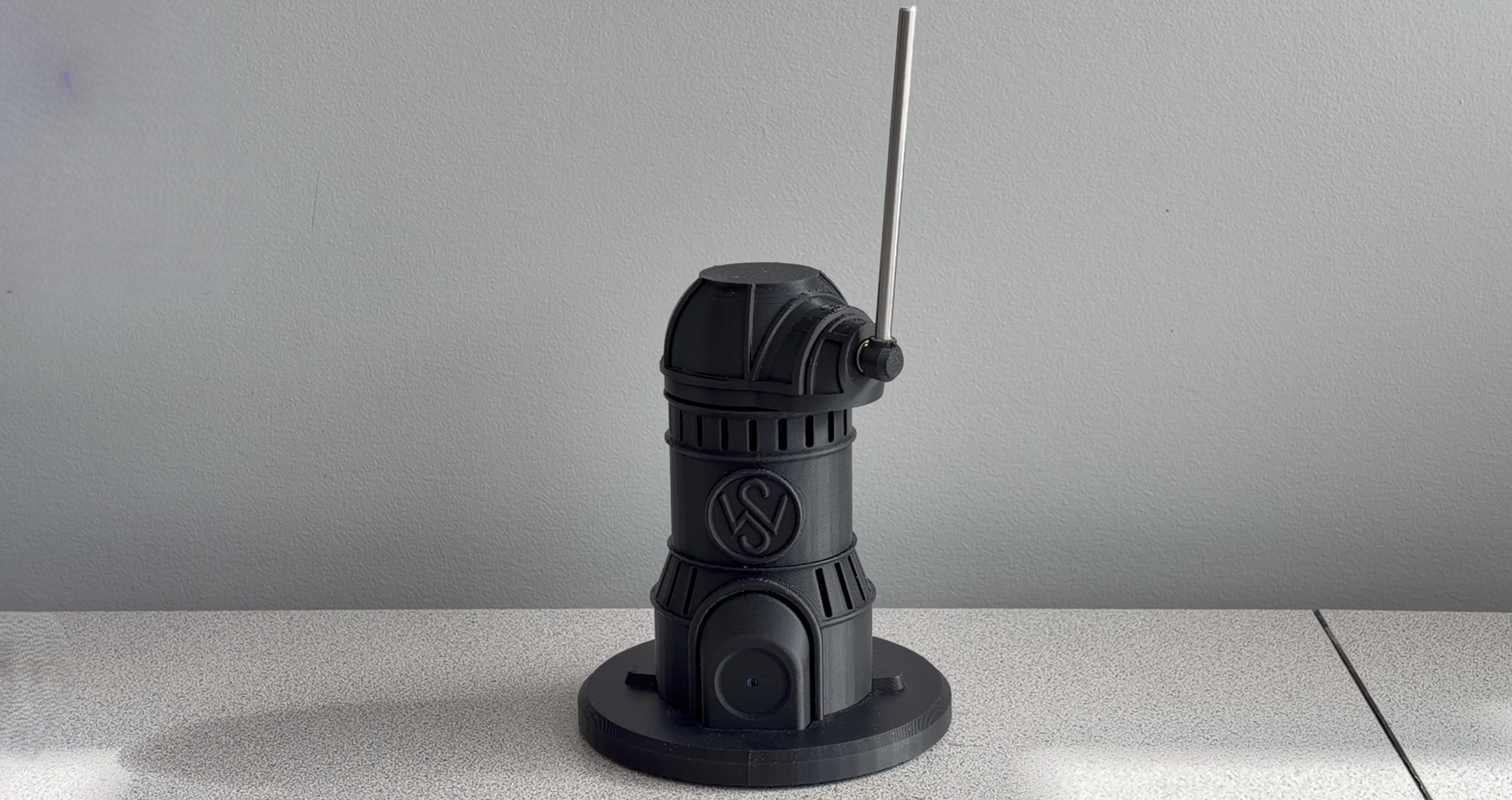
Furata Pendulum
Designing and building a custom desktop Furuta Pendulum — from CAD and from-scratch motor control to LQR balancing and autonomous swing-up
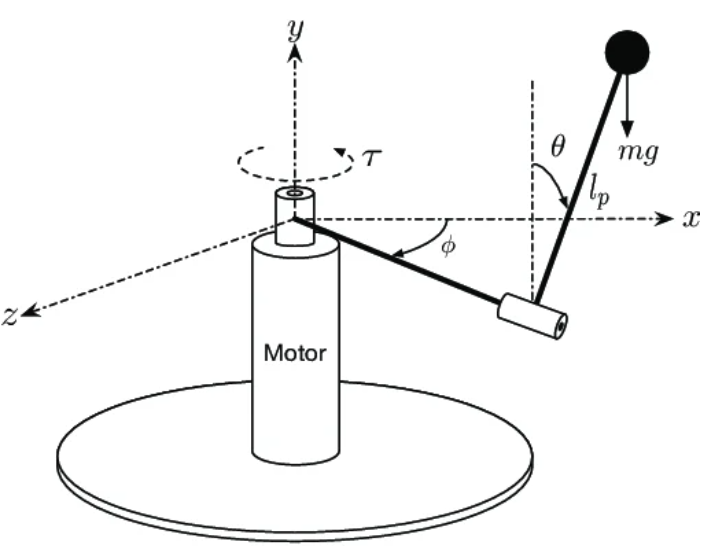
A Furata Pendulum, otherwise known as a rotary inverted pendulum, is a device which consists of a driven base which rotates about the vertical axis, and a freely swinging pendulum attached such that the base rotation can balance the pendulum in an upright position.
Project Goals
My goal for this project is to design and build a compact, desktop Furata Pendulum based on an ESP32. I've laid out the following requirements:
Stay within a budget of $150
Must balance effectively, balancing motion should be minimal and smooth
Final design should be compact and aesthetic
Must be quiet enough to not be annoying
Utilize an ESP-WROOM-32 Dev board (I had an extra one lying around)
Not a requirement: Would be nice to develop a user interface to adjust system parameters once it is functioning
I think this project will present a rich learning opportunity in the field of control systems which I am beginning to learn, and what better way to learn than with a hands-on project!
Stage 1: Design and Parts
To begin the design, I tabulated all the components I will need to build the system. Below is a list of all the parts I sourced:
Part Name | Description | Cost $(CAD) | Qty |
|---|---|---|---|
Microcontroller | ESP-WROOM-32 | n/a | 1 |
Power Supply | 12V USBC Module | 1.63 | 1 |
Power Switch | JR223B Induction Capacitive Switch | 5.41 | 1 |
Voltage Regulator | Step down buck converter | 2.50 | 1 |
Motor Driver | DRV8313 SimpleFOC Mini | 6.61 | 1 |
Motor | GM2804 motor + AS5048A Encoder | 52.38 | 1 |
Encoder | AS5048A | 11.59 | 1 |
Slip Ring | 6 channel | 12.09 | 1 |
Frame/Base | 3D Printed frame | n/a | 1 |
Wire Terminals | JINH CMK633 | 5.33 | 1 |
Fasteners | SHCS M2, M3 620pcs kit | 13.79 | 1 |
M5 Steel Rods | 30x 22mm, 5x 100mm | 14.02 | 1 |
Shrink tube | Shrink tube 127pcs bag | 3.30 | 1 |
Bearings | Ball bearings, 5pcs | 3.33 | 1 |
Wire | 20awg wire rolls, 6 colour, 10ft ea | 20.04 | 1 |
Total Cost: $152.02 |
I chose to hit SolidWorks and try making a rough design to get an idea of how it will look and function.
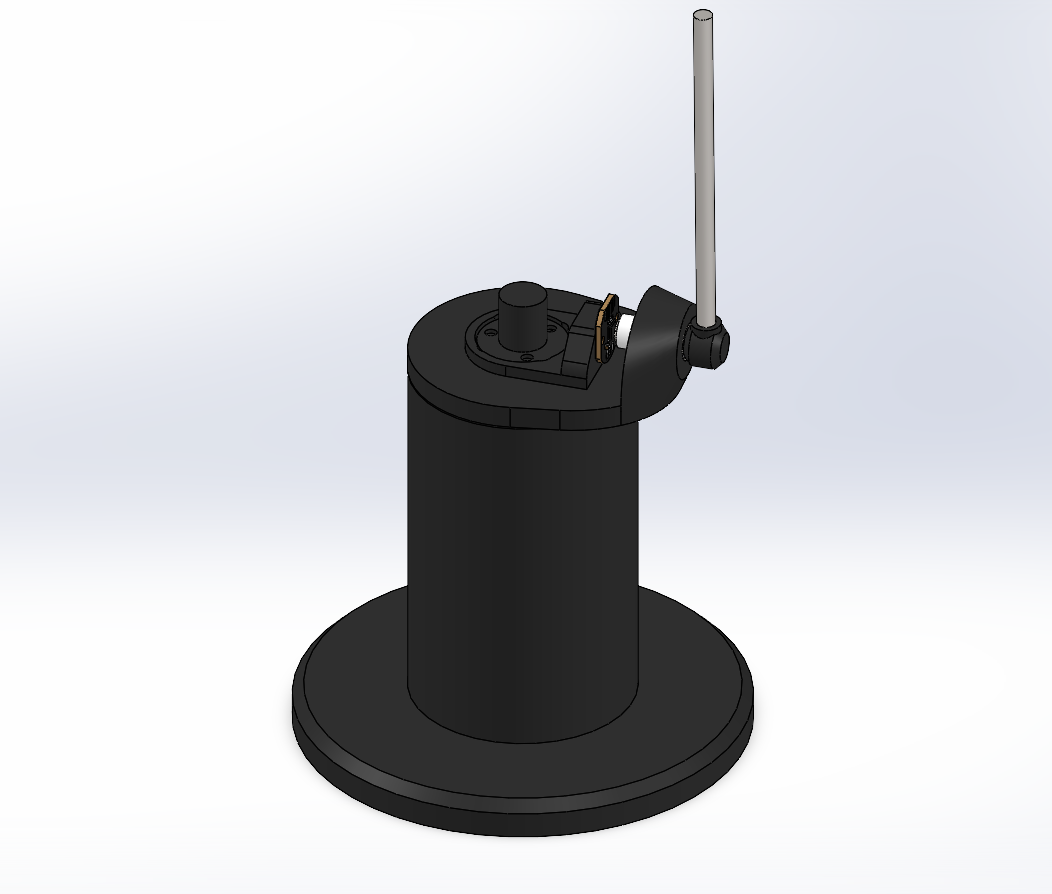
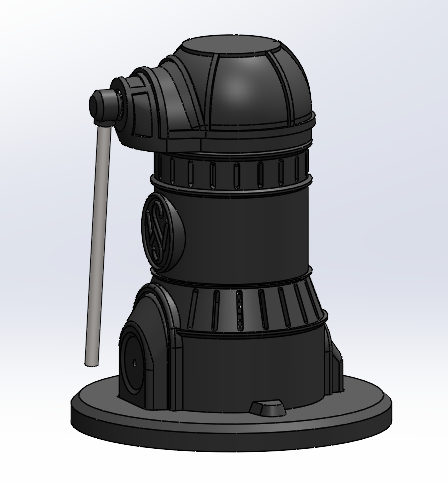
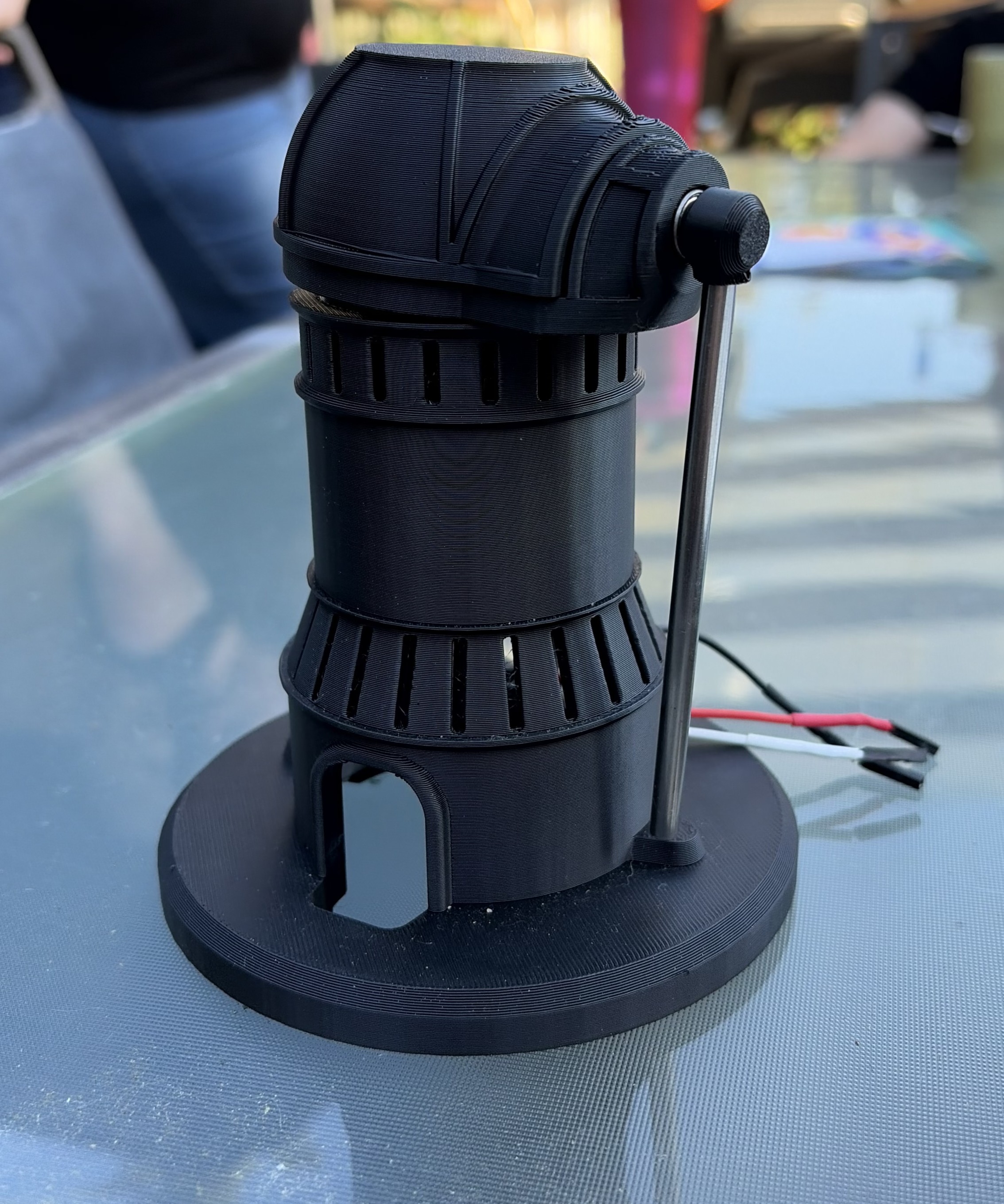
This rough form factor meets my requirement for compactness at a total height of only 220mm to the top of the pendulum.
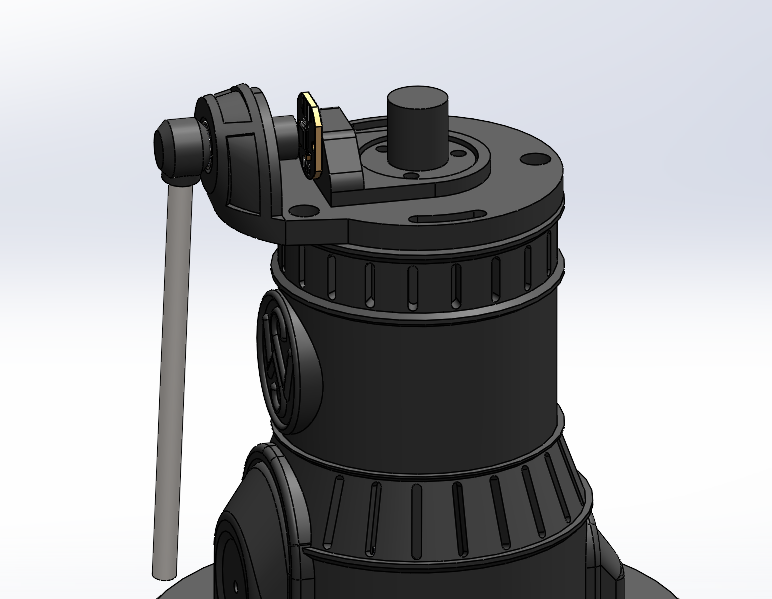
While hashing out the initial design, I had to consider a few functional requirements. I quickly realized that the wires from the top encoder would twist relative to the fixed base — the two solutions for this would be to either restrict the rotation of the base, or to implement a slip ring, allowing the wires to rotate freely. I chose to use a slip ring.
With that sorted, the initial design felt solid enough to start ordering parts and move forward.
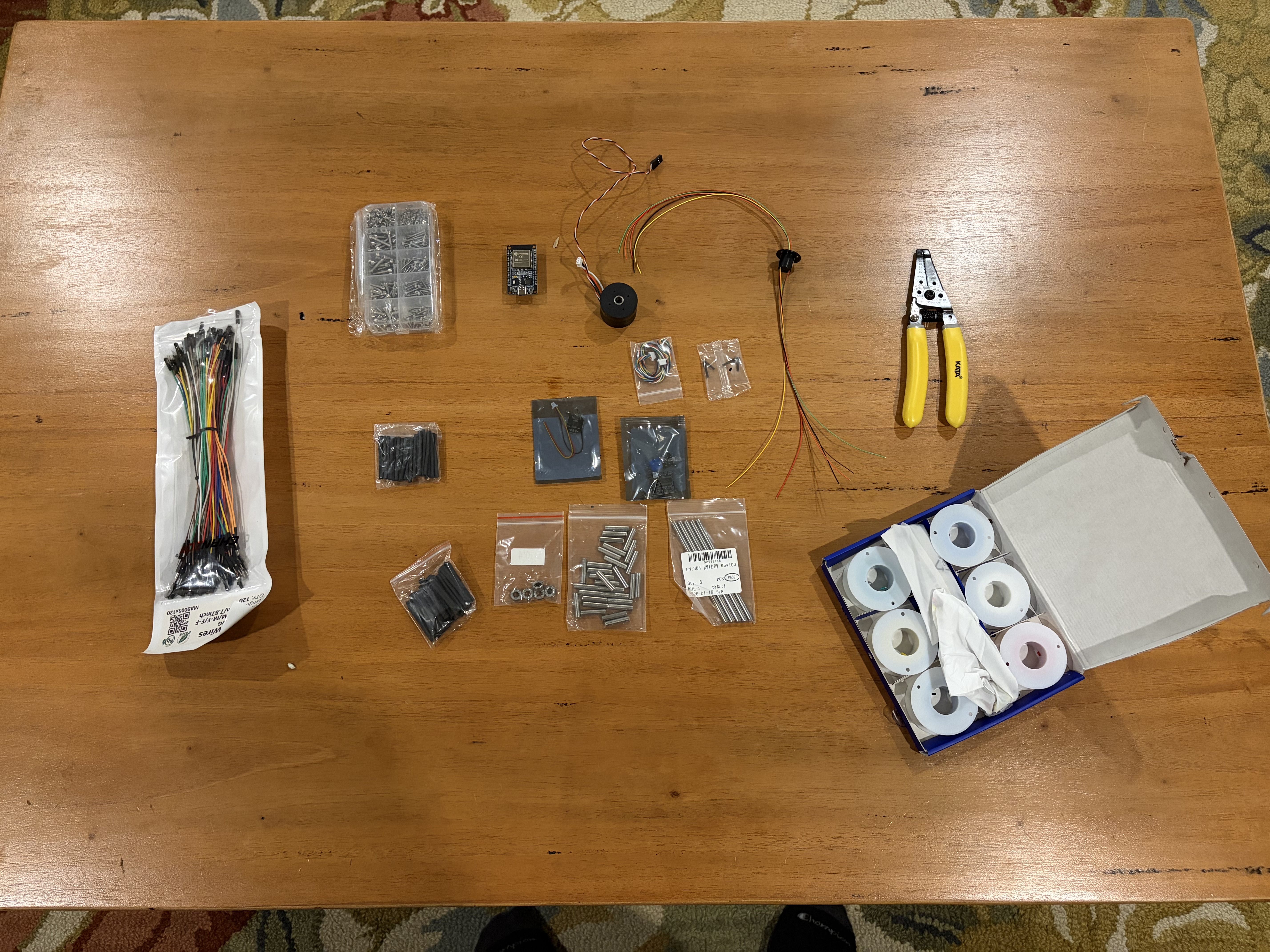
Stage 2: Electronics Capsule Design and First Motor Test
Before getting into firmware, I wanted to get the electronics off the bench and into something that actually resembled a real build. The concept design made it clear early on that there were going to be a lot of components crammed into a small footprint — ESP32, motor driver, buck converter, capacitive power switch, and all their associated wiring. Rather than let that turn into a rat's nest, I designed a dedicated electronics capsule in SolidWorks to house everything cleanly.
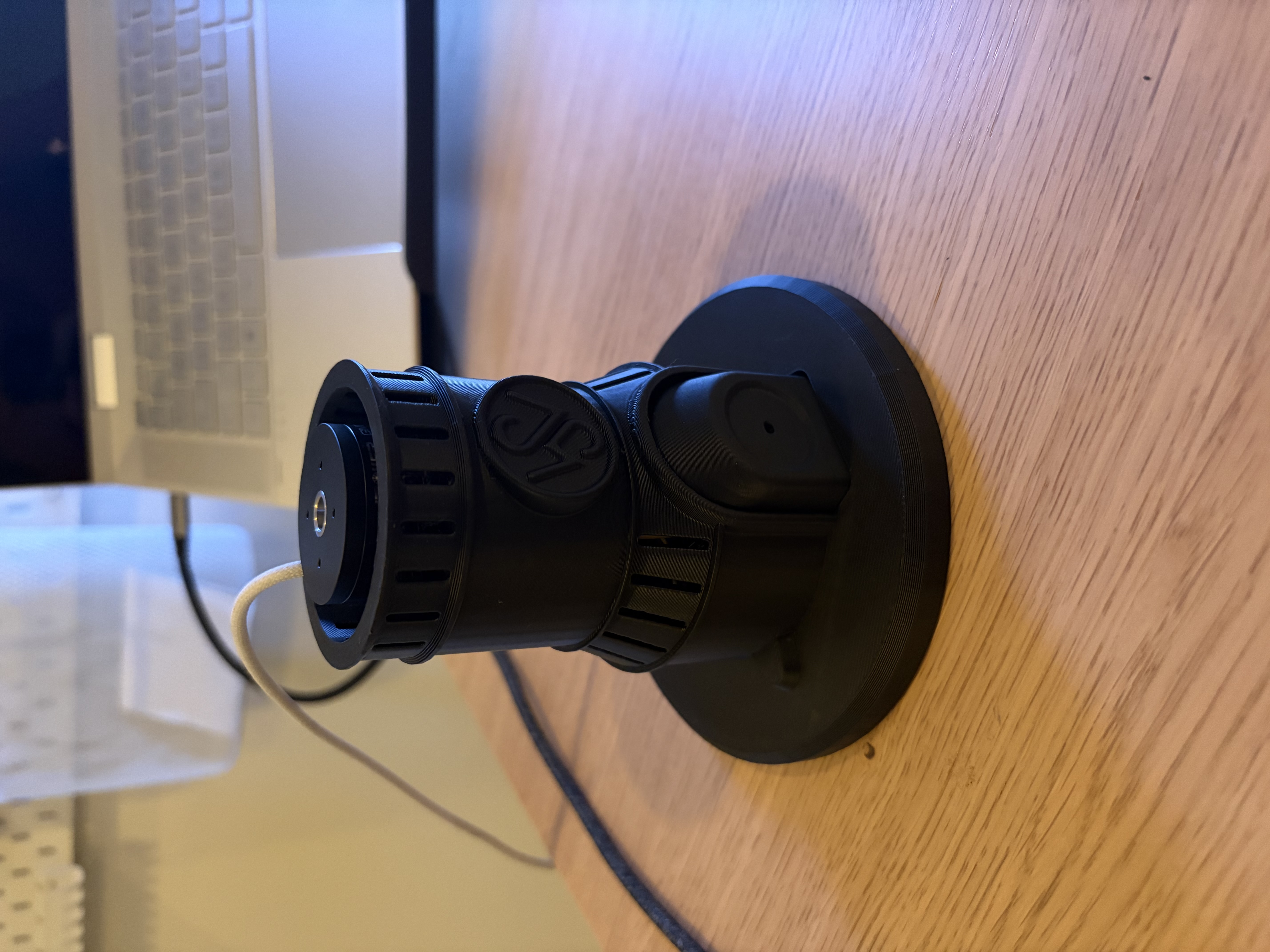
The design is two-part: an inner electronics capsule that holds all the boards and wiring, and a cylindrical outer housing that fits over top of it and holds the motor on the upper face. The ESP32 sits upright in the capsule alongside the DRV8313 motor driver and the buck converter, with cutouts and mounting features to keep everything in position. The outer housing bolts over the capsule and gives the whole thing a clean, intentional look — it doesn't look like a prototype, which was important to me.
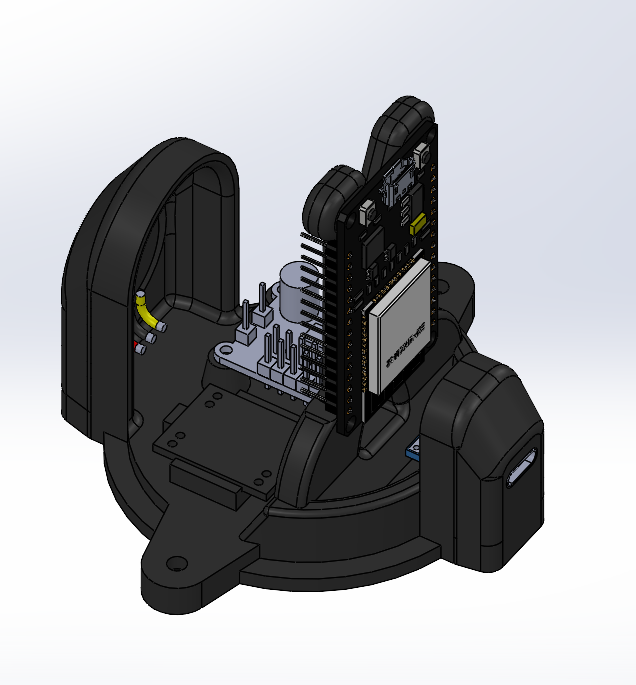
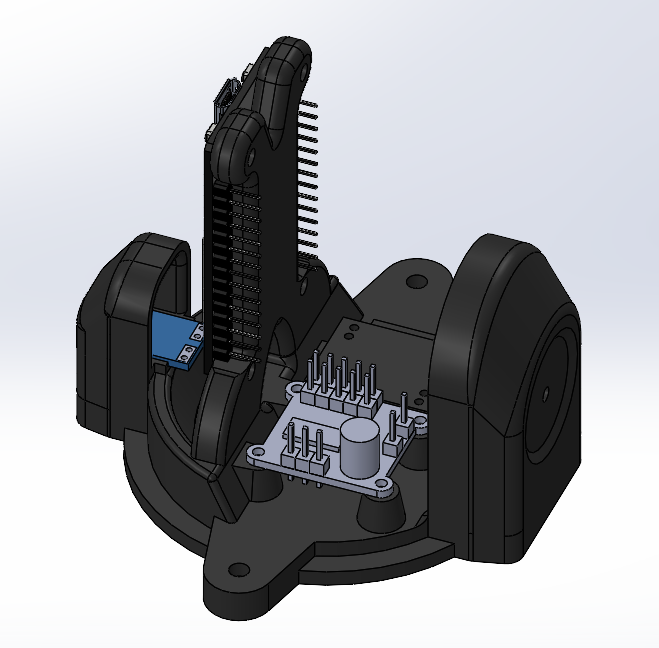
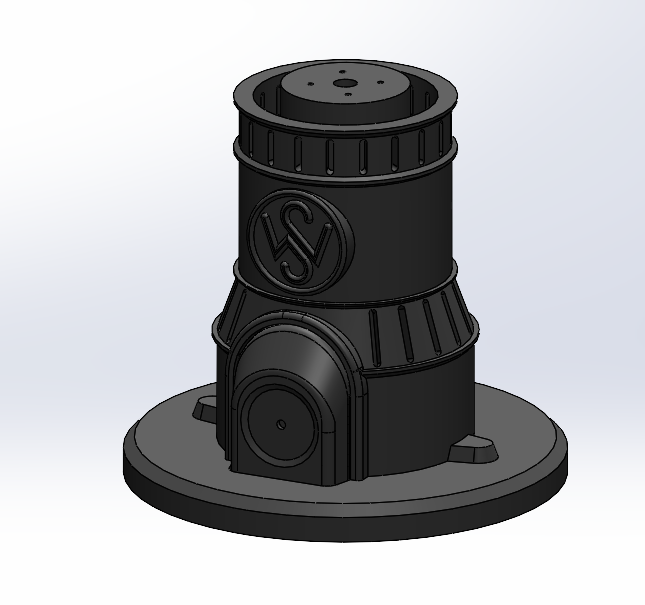
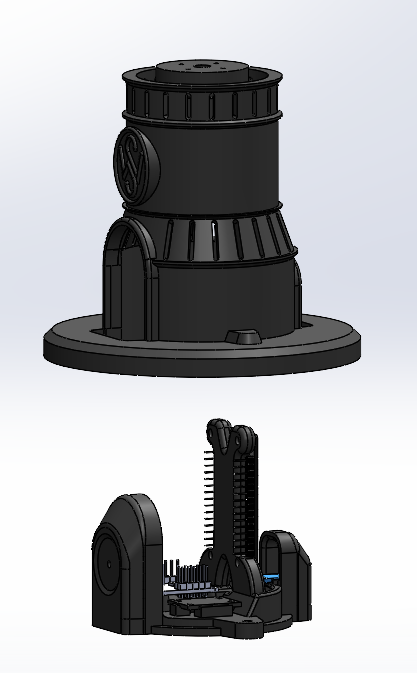
Getting this design right took some iteration. Fitting all the boards in a compact arrangement while still leaving room to actually connect wires is more of a puzzle than it sounds, and I had to think carefully about assembly order — some components need to go in before others because there's no access afterward.
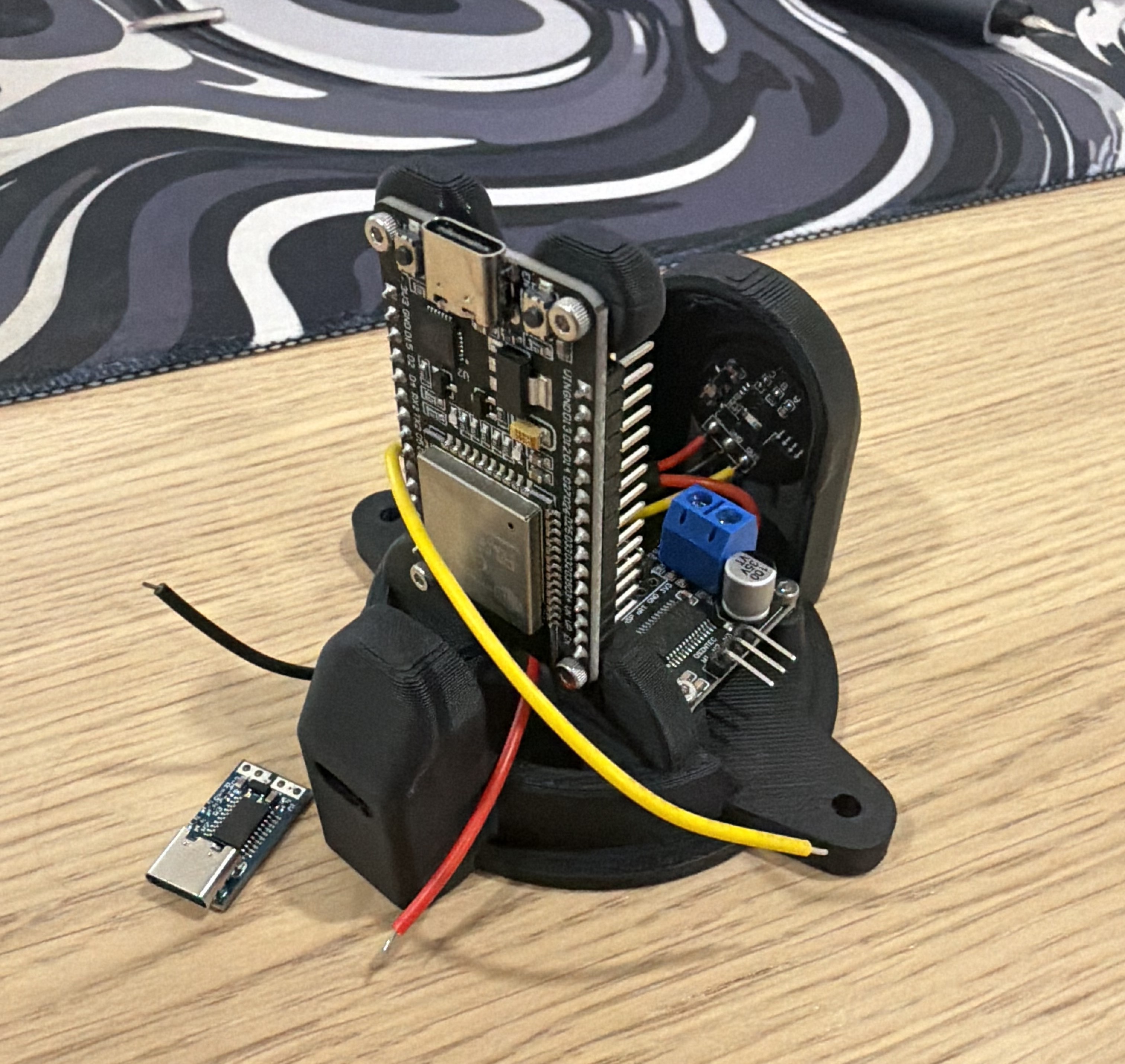
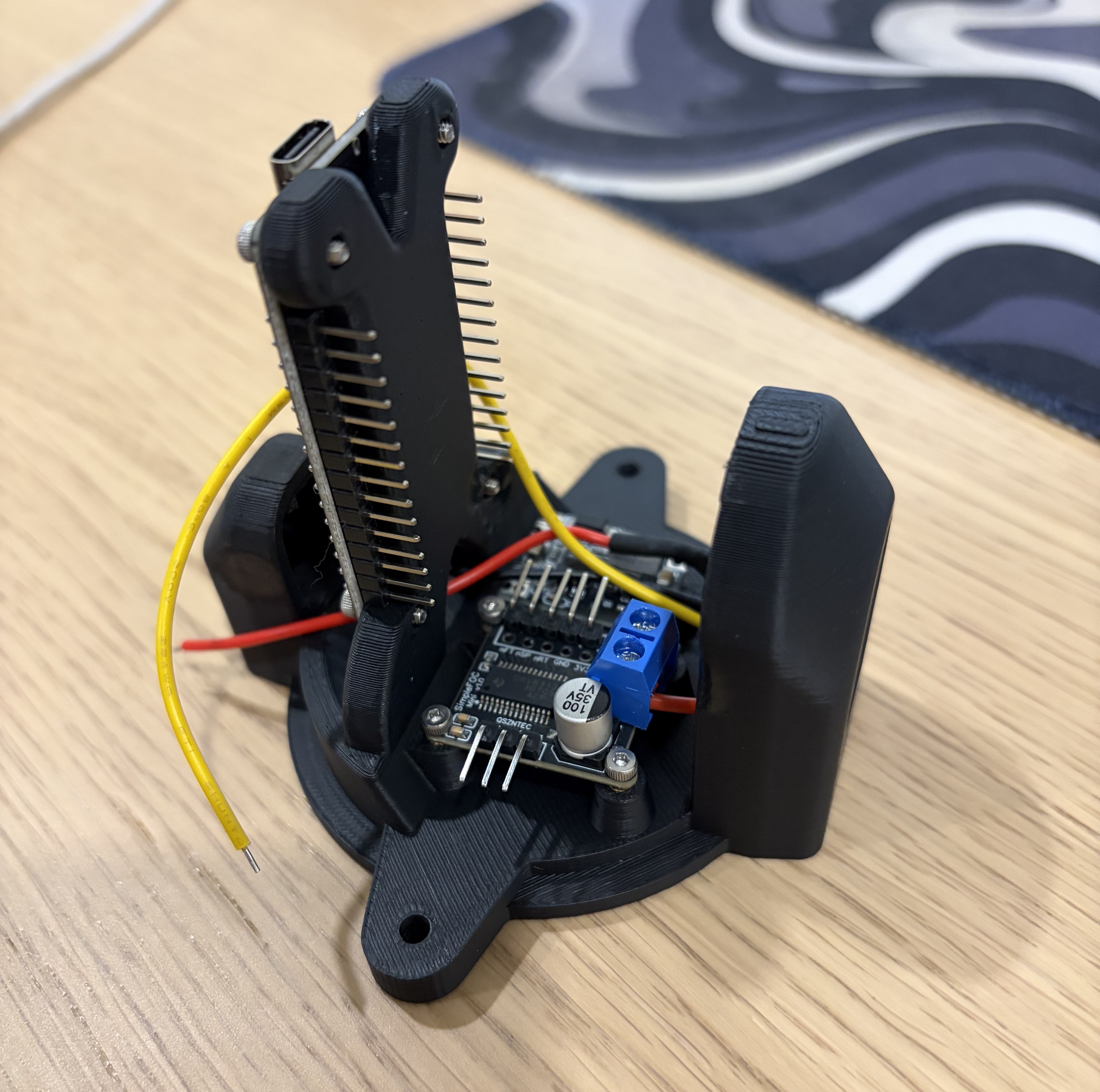
With the capsule printed and everything housed, I had the motor and driver wired up to the ESP32 for the first time. Before writing any closed-loop control code, I tested the motor under open-loop field oriented control (FOC) — just commanding a rotating magnetic field at a fixed speed and letting the rotor follow it. I was very excited to see the motor spin up smoothly and quietly for the first time. Open-loop FOC is just the starting point, but getting a BLDC motor to spin correctly from scratch with the SPI encoder reading back sensible data and the three phases commutating properly is a real milestone.
Stage 3: Closed-Loop Motor Control (FOC)
With open-loop FOC confirmed working, the next step was closing the loop — adding position and velocity feedback to actually control where the motor goes, not just have it spin. This is where things got more involved.
I could have dropped in the SimpleFOC library for this and moved on, but I wanted to actually understand what was happening under the hood — so I kept the commutation implementation from scratch in C++.
The basic loop looks like this:
Read the rotor angle from the AS5048A magnetic encoder over SPI. The AS5048A gives 14-bit absolute angle data, and the firmware handles the full SPI transaction manually — constructing the read command, computing and verifying the parity bit, and masking the angle out of the 16-bit response.
Compute three-phase voltages. Given the electrical angle (rotor angle × number of pole pairs), the three phase voltages are sinusoidal functions offset 120° apart, scaled by the desired torque command. This is the heart of FOC.
Auto-calibrate on startup. On power-on, the firmware locks the rotor to a known position using a fixed voltage, waits for it to settle, reads the encoder, and stores that as the zero offset. Every subsequent angle reading gets corrected relative to this — without this step, the motor would fight itself every time it booted.
Drive the phases with PWM. The ESP32's LEDC peripheral generates three 20kHz PWM signals at 10-bit resolution, one per phase. The phase voltages get mapped to duty cycles centered at 50% (midpoint = zero voltage).
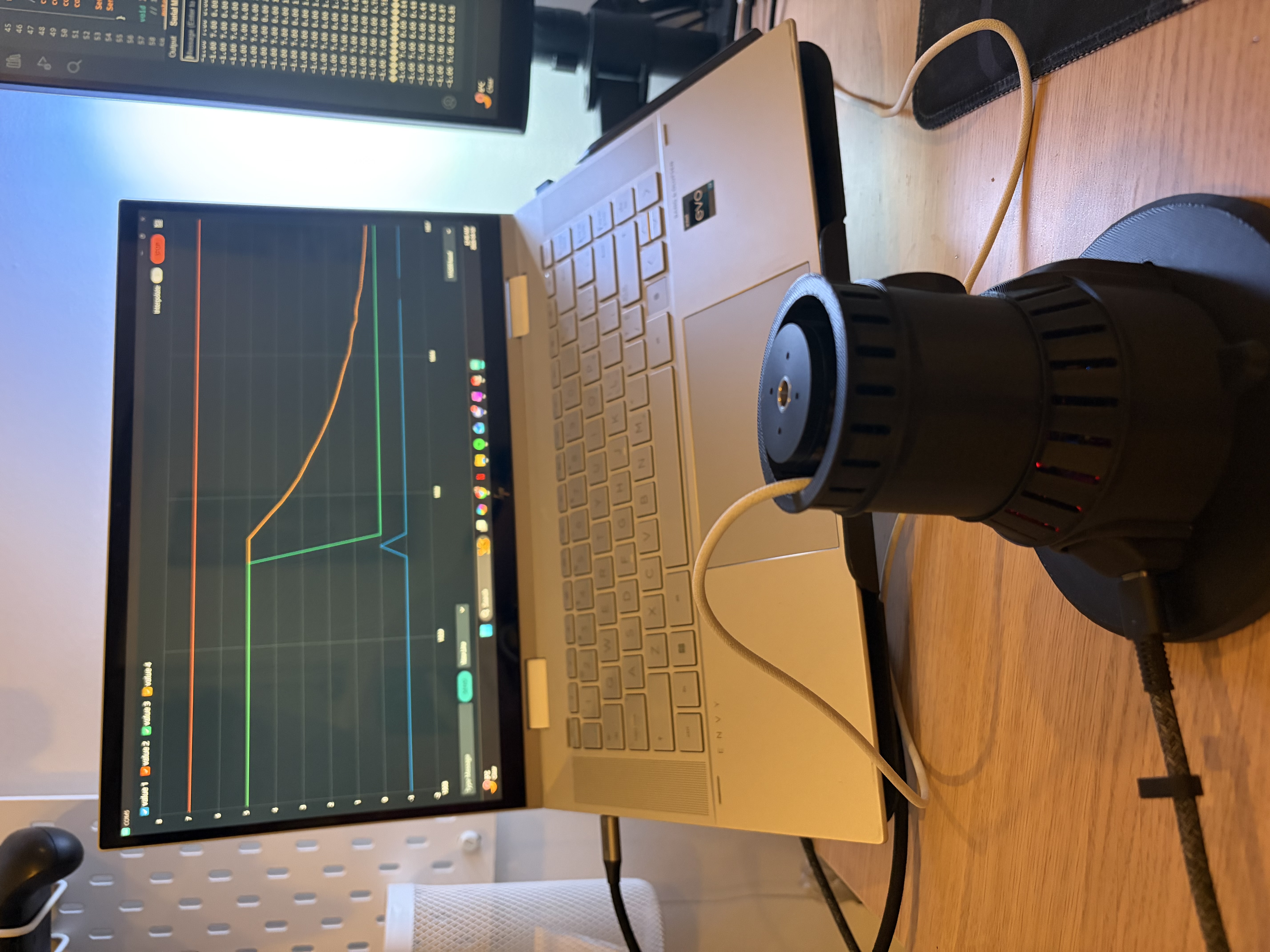
Note that the firmware and GUI code for this project can be found on my GitHub.
Making the Angle Data Useful
I needed to handle the fact that the AS5048A wraps its output at every full rotation (0 → 2π → 0). For position control you need a continuous, unwrapped angle. The firmware tracks this by detecting the wrap-around jumps and accumulating an offset.
Velocity Estimation
Velocity is computed the straightforward way: Δθ/Δt between loop iterations. The problem is that numerical differentiation is basically a noise amplifier, so a first-order low-pass filter (exponential moving average, 20ms time constant) is applied to keep the velocity estimate usable.
The Control Architecture
With a working angle signal, I put together a cascaded control loop:
Outer loop — Position PD controller (250Hz): Takes position error, applies proportional and derivative terms, outputs a velocity target.
Inner loop — Velocity PI controller (500Hz): Closes the loop on velocity, with anti-windup clamping on the integrator and a feedforward term to reduce steady-state lag.
This architecture is textbook for servo drives, but implementing it from scratch taught me a lot of things that textbooks gloss over — timing interaction between the two loops, how aggressive you can make the inner loop before it destabilizes the outer one, and the practical difference between "works in theory" and "works on hardware."
A Noise Mystery (Partially Solved)
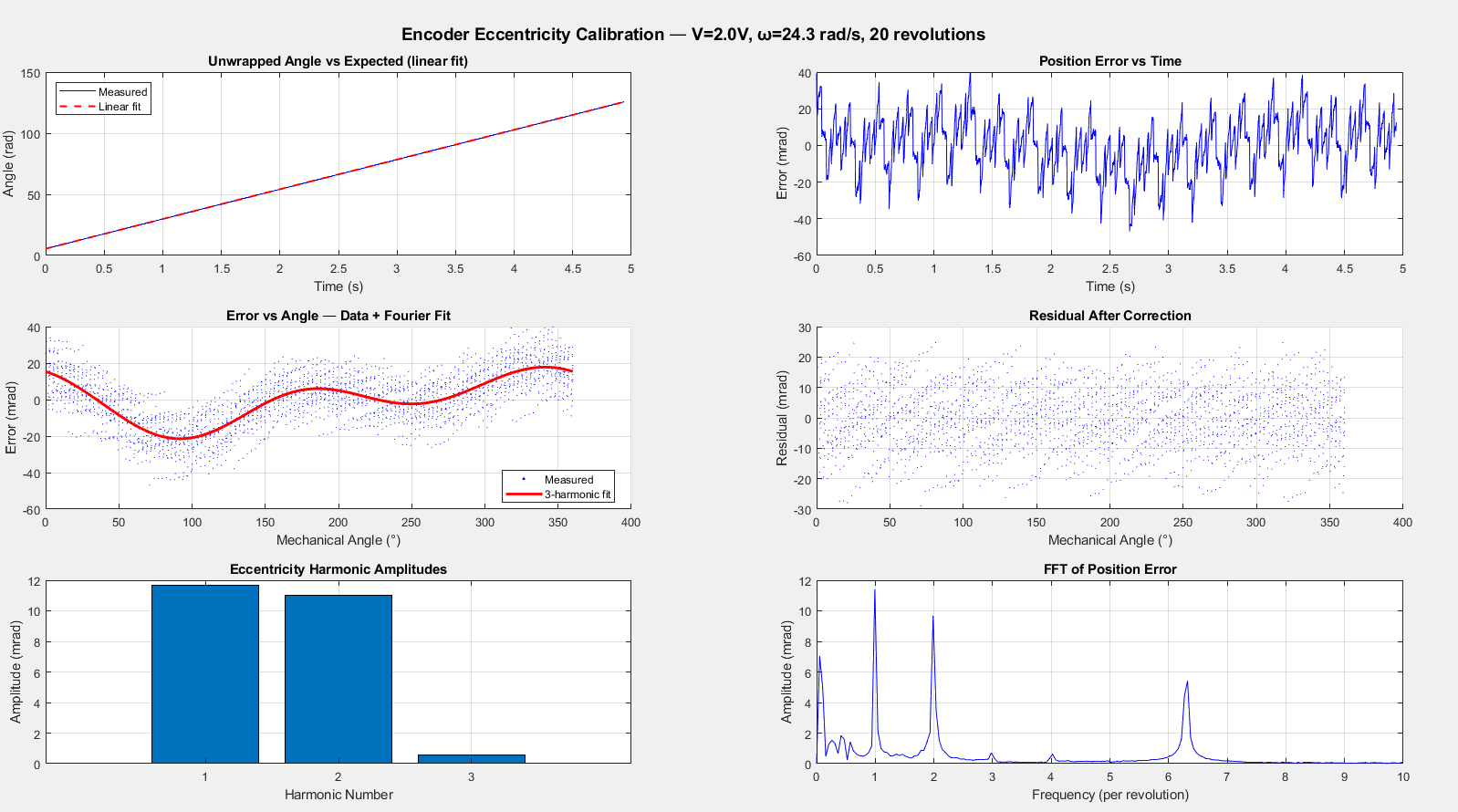
During low-speed testing, there was a repeating speed ripple in the velocity feedback, even under a constant velocity command. I ran a Fast Fourier Transform on the captured data and found a clear periodic component, but after systematically testing everything I could think of (encoder wiring, PWM frequency, angle correction parameters, varying speed), I couldn't pin down the root cause definitively. It doesn't meaningfully impact position control performance, so I made the call to move forward and revisit it if it causes problems with the balancing algorithm.
Stage 4: Building a Tuning GUI (Because Re-Flashing Gets Old Fast)
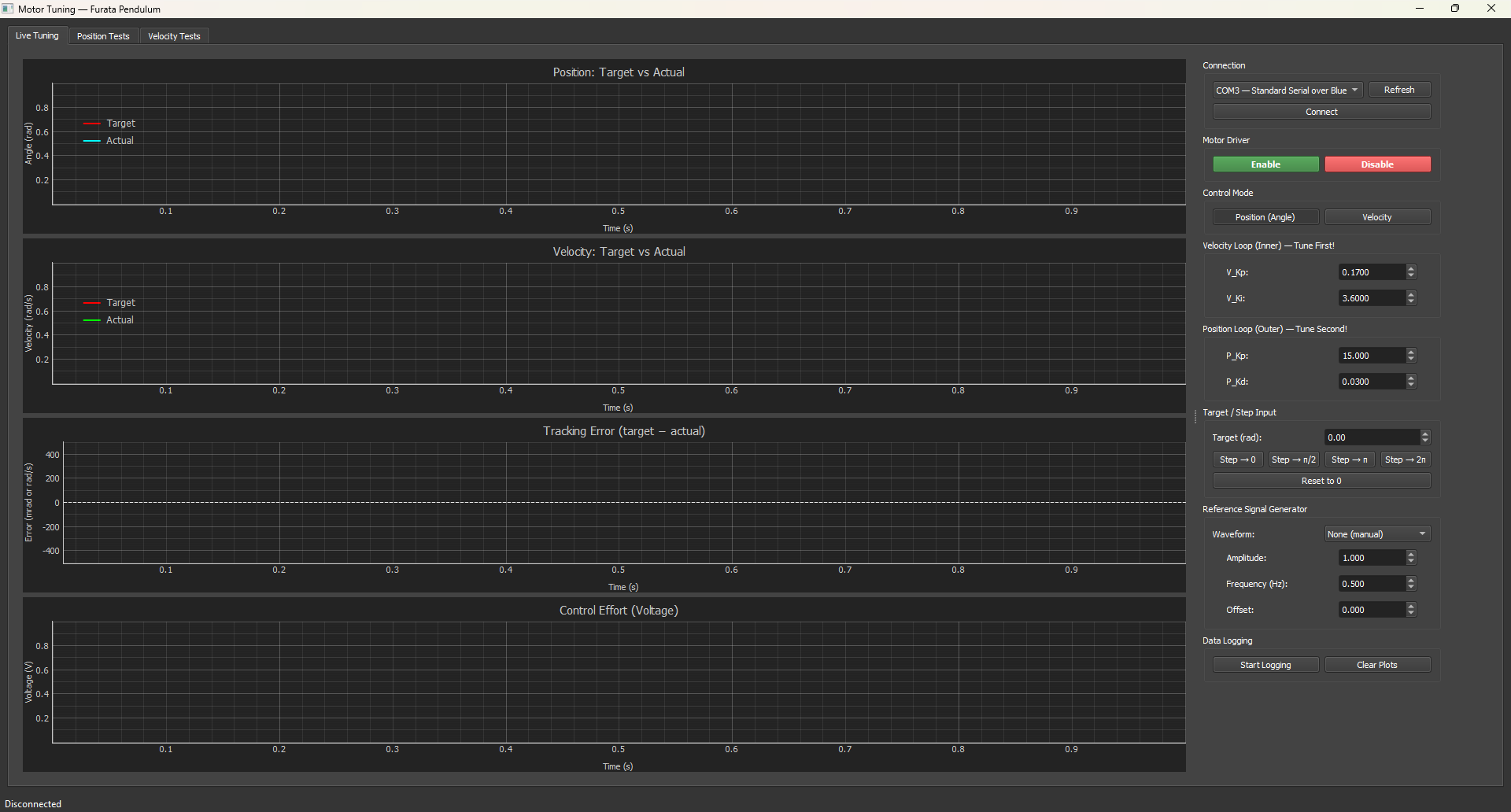
PID tuning by manually editing firmware constants, re-compiling, and re-flashing is exactly as tedious as it sounds. So I built a custom desktop GUI that talks to the ESP32 over Bluetooth serial at 460800 baud.
The GUI gives me:
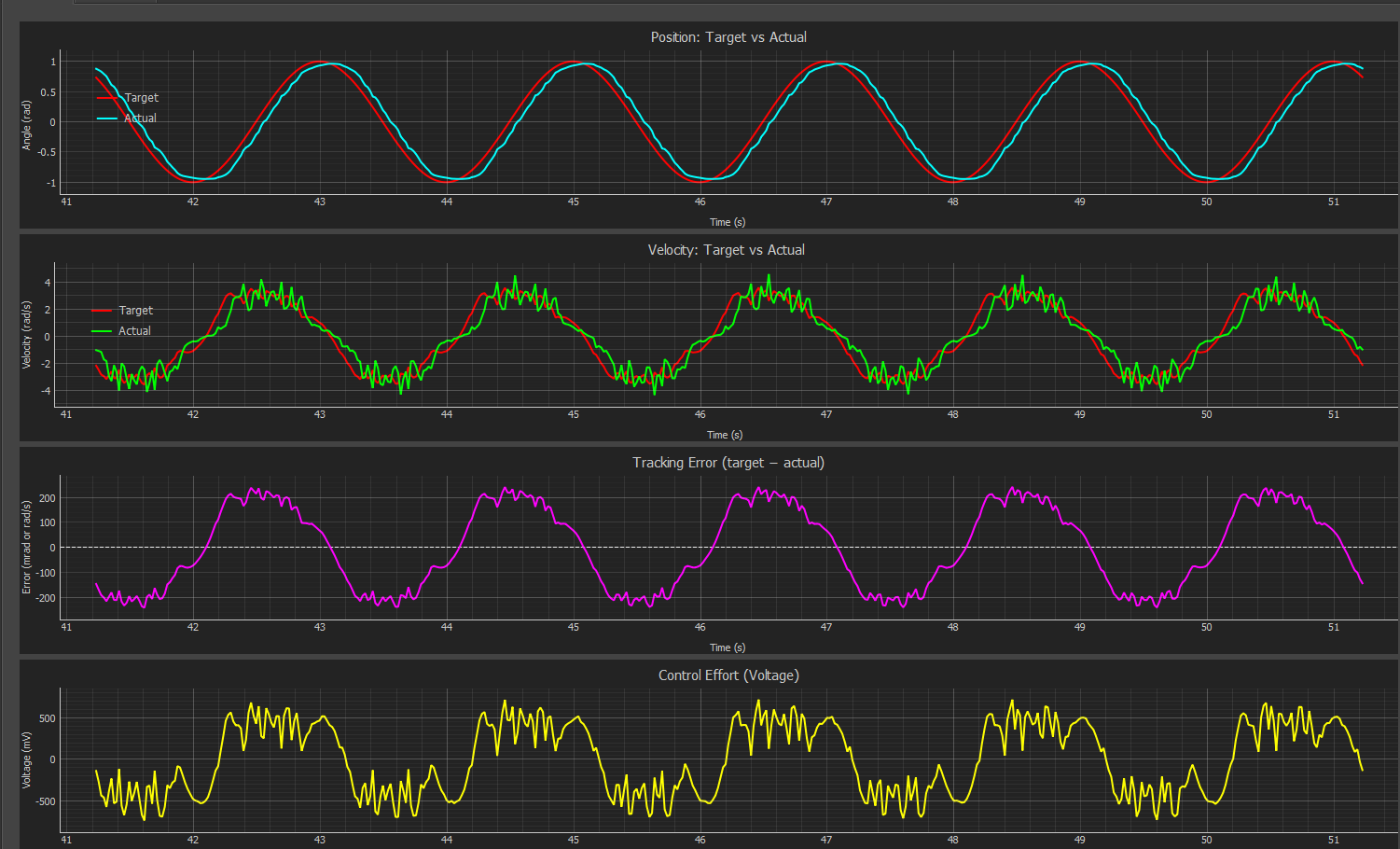
Real-time plots of position target, actual position, velocity target, actual velocity, and motor voltage — all live
Live gain adjustment via sliders and input fields — change Kp, Kd, Ki on the fly without touching the firmware
Built-in signal generator — command square wave, sine wave, or triangle wave targets at configurable frequency and amplitude, which is essential for characterizing how the system actually responds
Mode switching between position and velocity control, plus a motor enable/disable toggle
On the firmware side, it's a simple text-based command protocol — single-line strings like PP=50.0 to set position Kp, SG=Q to start a square wave. The ESP32 streams back CSV data at 50Hz.
Having this tool made tuning dramatically more efficient.
Stage 5: Full Mechanical Design and 3D Printing
With the motor control working well on the bench, I went back to SolidWorks to finalize the full assembly design before printing anything.
The design had a few constraints that all had to play nicely together:
Total height ≤ 220mm (my compactness target) while still housing the motor, both encoders, the slip ring, the electronics, and the power supply
The slip ring needed proper housing — it passes the upper encoder's SPI wires through the rotating joint without tangling
Bearing seats needed to be press-fit, which means tolerancing matters
Everything needed to be serviceable — I didn't want to have to destroy the assembly to access the wiring
All parts not obtained off the shelf were custom designed primarily by 3D printing: motor mount, base frame, slip ring housing, upper encoder bracket, and the pendulum arm. Standard 5mm steel rods serve as the pendulum body.
Stage 6: Assembly and Wiring
Putting It Together
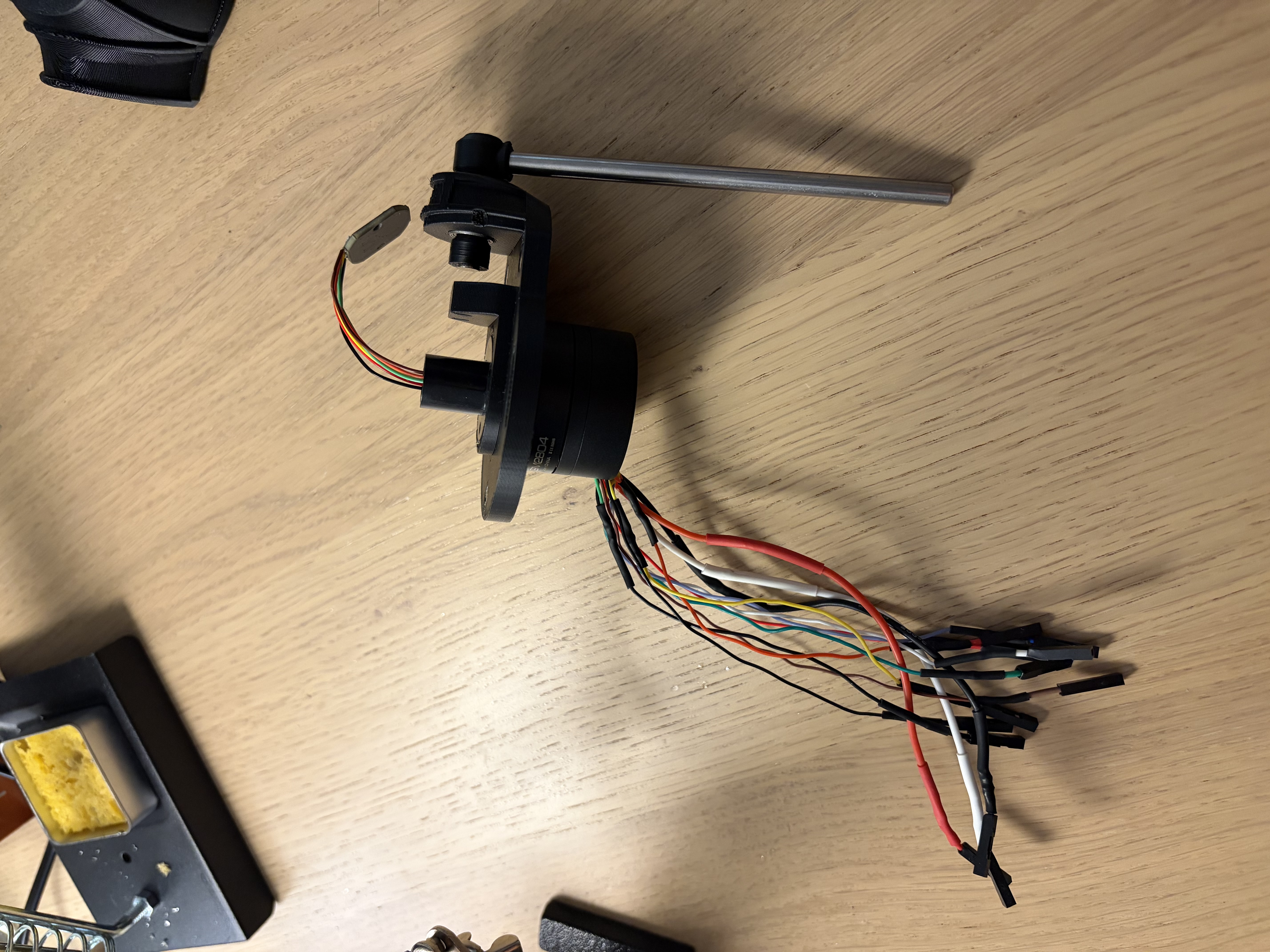
With parts printed and hardware on hand, it was time to actually assemble the thing. The assembly sequence had to be thought through carefully — the slip ring wires needed to go through the hollow motor down into the electronics before closing up the base structure, since there's no getting to them afterward. I used M2 and M3 SHCS fasteners throughout.
The Wiring — The Humbling Part
I'll be honest: the wiring was the most time-consuming and occasionally frustrating part of this whole build. A few highlights:
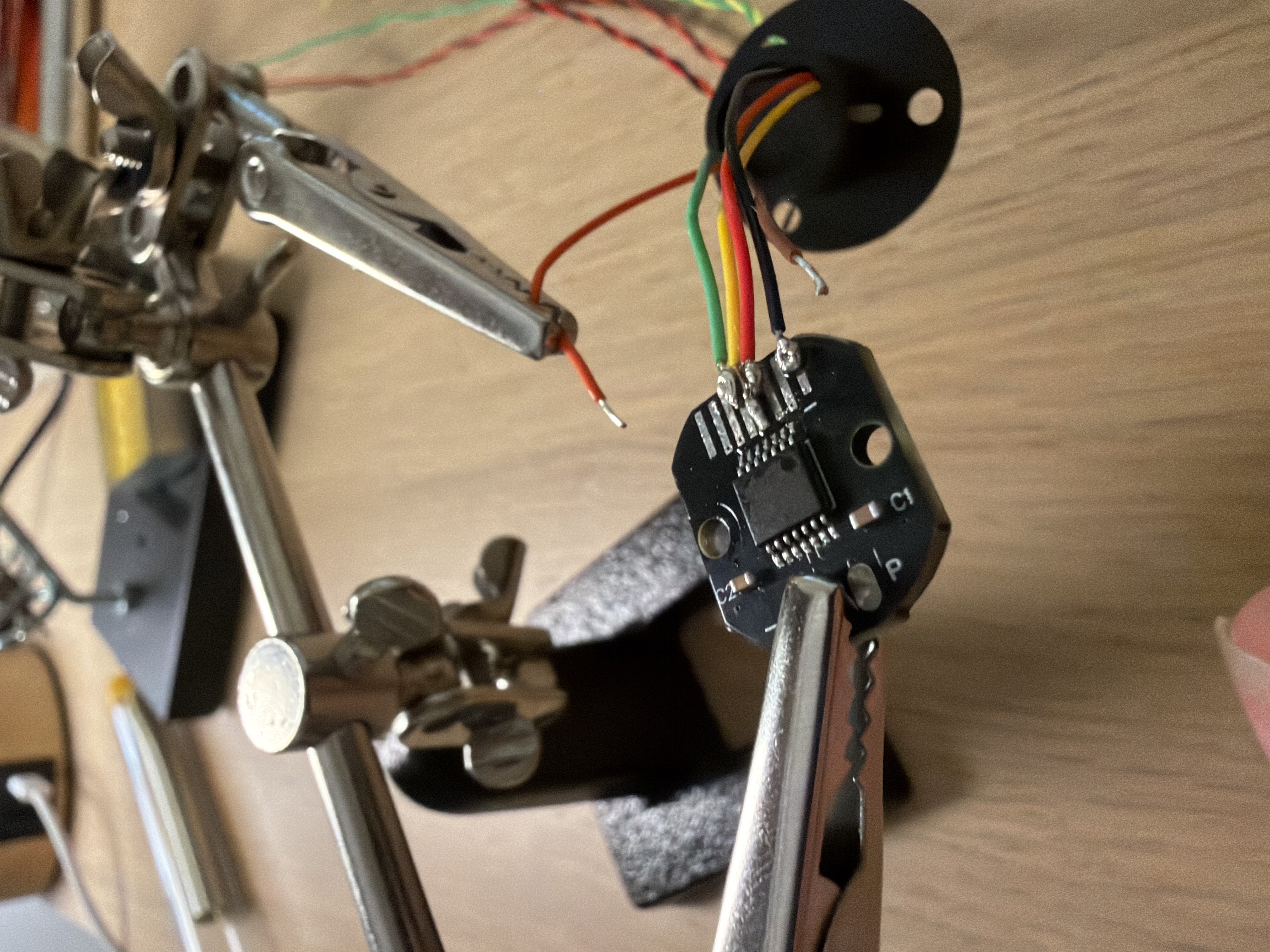
The upper encoder solder joints were genuinely difficult. The AS5048A has 1mm-pitch surface pads — which is small enough that you're working under magnification, holding your breath, and praying you don't bridge two pads or lift one off the board. This is the kind of fine soldering skill that I did not have going into this project, but the only way to actually get it is to do it a bunch of times, and I got it done eventually.
SPI bus wiring: Both encoders share the same SPI bus (MOSI, MISO, SCK) but have separate chip-select lines.
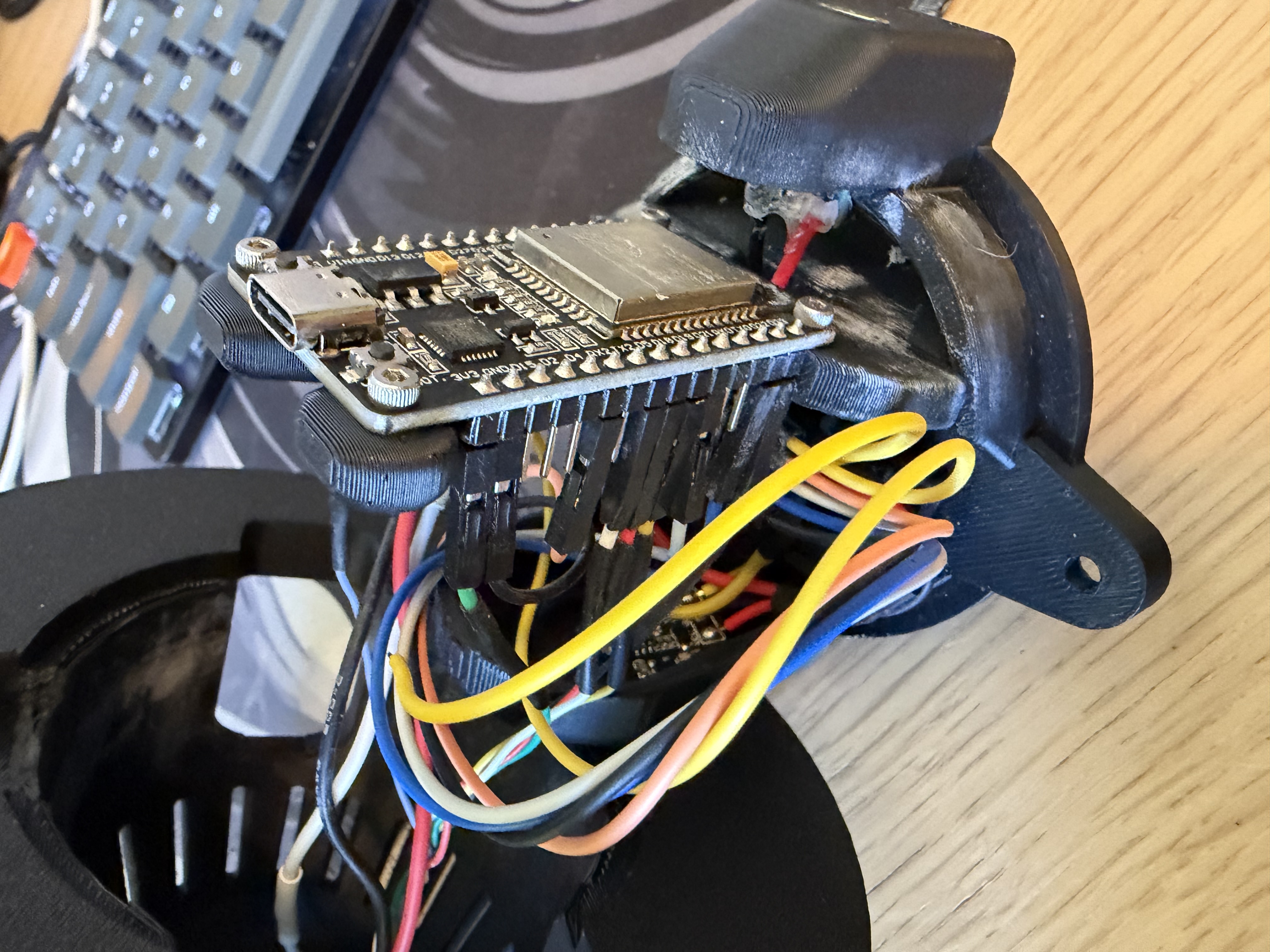
Connector system: All logic wires terminate in Dupont connectors that plug into the ESP32's header pins. This kept things flexible during development — easy to re-wire when something needed changing. In hindsight, a proper connector block or even a simple custom PCB would have been tidier and more robust. That's a "next project" lesson.
Stage 7: Power System and Dual-Encoder Validation
Both Encoders, Working at Once
After the full assembly, I extended the firmware to read both encoders simultaneously — the base encoder for FOC and motor control, and the upper pendulum encoder which the balancing algorithm will need. Both share the SPI bus, managed by toggling their respective chip-select pins. I got both reading sensible angle data at the same time which had me thrilled.
The Power System Needed a Revision
The original design used a 3.3V buck converter to step down the 12V motor supply for the ESP32 and encoders. In testing, this caused two problems:
Bluetooth reliability. The ESP32's radio performance degrades when VDD is marginal, and 3.3V with motor switching noise in the mix was enough to make Bluetooth serial unreliable.
Wrong input pin. The ESP32's Vin pin is designed for 5V — it has an onboard regulator to step down to the 3.3V the core actually runs on. Feeding 3.3V into Vin works, but you're using it outside its intended operating mode.
Swapping in a 5V buck converter fixed both issues. Bluetooth became reliable, and everything is now running in its intended operating range.
One Remaining Quirk
There's a power-on reset issue where the ESP32 occasionally needs a manual reset button press to start executing after the power switch is toggled. The likely culprit is the EN pin not being held low long enough during the 5V regulator's startup ramp, so the ESP32 starts before its supply is fully stable. An RC delay on the EN pin should fix it. It's on the list.
Stage 8: Modeling the System
With the hardware built and motor control running well, the project finally arrived at the part I built the whole thing for: making it balance. And that part starts on paper, not in code.
The Furuta pendulum is a two-degree-of-freedom nonlinear system: the arm angle θ (the only coordinate the motor actually drives) and the pendulum angle φ, measured from upright. I derived the full equations of motion by hand using Lagrangian mechanics — working from energies rather than forces — which avoids having to track internal constraint forces through a rotating reference frame. The subtle part of the derivation is that the pendulum's pivot rides on the moving arm tip, so its kinetic energy becomes trickier.
Linearizing the equations about the upright position gives a 4-state state-space model — arm angle, pendulum angle, and their two velocities — and that model immediately tells you two important things:
The upright equilibrium is unstable, with a pole at about +11.6 rad/s. That's the mathematical fingerprint of a pencil balanced on its tip — left alone, a small tilt grows on a timescale of roughly 85 milliseconds. That's the clock the controller has to beat.
The system is controllable. A rank check on the controllability matrix confirms that torque at the arm alone can, in principle, drive the pendulum anywhere in its state space — balancing is physically achievable. Very good to know before spending weeks trying.
If you want to see the actual equations — the Lagrangian, the linearized state-space, LQR, the observer, and the swing-up energy law — I've put all the math on a separate page: The Math Behind the Furuta Pendulum.
Stage 9: Parameter Identification
A model is only as good as the numbers you feed it. Some parameters were easy — masses and lengths come from a scale and calipers, and the rod's inertia follows from a textbook formula. The interesting ones — inertias, friction, and the motor's electrical constants — had to be identified from experiments on the real hardware.
The Free-Swing Test
For the pendulum itself: lock the base, pull the hanging pendulum over about 15°, let it go, and log the decaying swing. A log-decrement analysis of that data yields the natural frequency, the damping, and — best of all — the pendulum's effective inertia. The measured inertia matched my derived value to within 1.3%. There's also a neat symmetry hiding in it — the gently oscillating hanging pendulum and the unstable upright one are the same equation with the sign of the gravity term flipped.
Characterizing the Arm and Motor
The arm side took a small suite of open-loop experiments: a voltage sweep to extract the motor's back-EMF constant (consistent across three separate sessions), a step test, and spin-down tests for inertia and friction.
The Torque Budget
The most important output of all this was a hard number for what the motor can actually deliver. The gimbal motor's brief peak torque, limited by simple Ohm's law at the firmware's 8V cap, works out to about 0.087 N·m — and an independent step test agreed with the electrical prediction to within 5%. That budget supports roughly a 5° recovery window when balancing. Not generous, but enough — and knowing the number precisely turned out to be useful in the next stage.
Stage 10: Designing the Controller — LQR in Simulation
For the balancing controller I chose LQR (Linear Quadratic Regulator) over the PID approach from the earlier motor-control stages. With one input (motor torque) and four states to coordinate, classical PID is an awkward fit — whereas LQR consumes the state-space model I'd just derived and hands back a single gain vector: the control law is simply u = −Kx, a weighted sum of the four state errors, recomputed 500 times a second.
I set up the linearized model in MATLAB/Simulink, tuned the Q and R weighting matrices, and verified in simulation that the closed-loop system pulls that unstable +11.6 rad/s pole safely into the stable half of the plane, the simulated pendulum catches and holds.
Then came the most valuable realization of the simulation phase: my first aggressive tuning demanded peak torques of over 6 N·m — about 70 times what the motor can actually do. The fix was deliberately designing a gentle controller — heavily penalizing control effort so the gains stay small and the torque requests respect the 0.087 N·m budget from Stage 9, with the firmware's voltage clamp as a safety net.
Stage 11: The Balance Firmware — and the Debugging
With gains in hand, I wrote a clean, single-purpose balance firmware, stripping out all the old cascaded-PID experiments. The structure is simple to describe: FOC commutation runs every loop; a 500Hz control loop reads both encoders, builds the 4-state vector, computes u = −Kx, and maps torque to voltage; telemetry streams out at 50Hz without ever blocking the control path. Around that core sit the practical touches that make it livable: an engage gate so the controller only drives when the pendulum is near upright, a dry-run mode that computes everything without powering the motor, live-tunable gains over Bluetooth, and a calibration trick — let the pendulum hang freely and let gravity define the reference: upright is exactly 180° from wherever it settles. Far more accurate than eyeballing vertical.
I also rebuilt the tuning GUI from Stage 4 for the new controller — live plots of all four states plus the control output, gain sliders, and CSV logging. It earned its keep many times over in what came next.
The Bring-Up Gauntlet
Because none of this worked on the first try, hardware never does. Here are a few highlights from the debugging process:
The mystery stutter. The motor would randomly stumble and stall in open-loop moves. I wrote two stripped-down test firmwares — one to exonerate the commutation and wiring, one to measure worst-case loop timing while toggling features on and off. The culprit: telemetry writes to Bluetooth were blocking the control loop whenever the transmit buffer backed up, freezing commutation for milliseconds at a time. Dropping telemetry to 50Hz and making the writes non-blocking cured it completely. Lesson learned: keep wireless out of the time-critical path.
The sign hunts. Nearly every sign convention in the system — which way is positive torque, positive angle, positive correction — had to be reconciled between the model and the physical hardware empirically. One backwards sign produced the memorable failure mode of a perfectly balanced pendulum on top of a slowly accelerating, runaway base.
Velocity filtering is a Goldilocks problem. Velocities come from differentiating the encoders, which amplifies noise, so you filter — but too much filtering delays the signal and starves the damping term, producing a slowly growing oscillation; too little and the motor chatters on noise. There is a sweet spot, and I found it the long way.
And then, one evening — it just stood there. The pendulum balances indefinitely, holding within ±0.33° of vertical, with only a gentle wander of the arm and barely audible corrections. After months of CAD, soldering, firmware, and math, watching it hold perfectly still is a huge win.
Stage 12: The State Observer — Cleaner Eyes for the Controller
Balancing worked, but the velocity signals still came from differentiating a 14-bit encoder staircase — fundamentally noisy, and the filtering tradeoff from Stage 11 has no truly good setting: every choice trades noise against lag. I found that a good fix is to use a state observer: run a software copy of the physics model in parallel with the real robot, feed it the same motor torque, and continuously correct it with the encoder measurements. The magic is that a position measurement corrects all four estimated states — including the velocities no sensor measures. It's also a beautiful piece of theory (details on the math page).
The implementation taught me a counterintuitive lesson. My instinct was to tune the observer to lean heavily on the smooth model and only lightly on the noisy encoders. That diverged — because with any real model error, trusting the model means trusting bad physics, and the resulting velocity lag fed back as negative damping. With an imperfect model, the observer needs to stay tightly married to the measurements.
The Observer as a Lie Detector
My favorite outcome of this stage wasn't the filtering at all. The observer's innovation (the tiny gap, between what the model predicted the encoders would read and what they actually read) is a direct, live readout of model error. During calm balancing, mine is essentially zero-mean noise, which means the first-principles model from Stage 8 predicts the real hardware almost perfectly. All of that derivation and parameter identification, validated in one plot.
It also caught a real problem: an intermittent ~17Hz oscillation that would destabilize the balance turned out to be an unmodeled degree of freedom — the base was slightly loose, and the motor was partly wiggling the base instead of the arm. Securing the base to the desk eliminated it entirely and gave the best control yet. Not every oscillation is a tuning problem — sometimes it's the mechanics.
Stage 13: Swing-Up — Teaching It to Stand On Its Own
Until now, every balance began with me placing the pendulum upright by hand. The final piece was swing-up: starting from hanging at rest, the machine pumps itself up to vertical and hands off to the LQR to catch. And it's a fundamentally different control problem — at the bottom, the motor (which drives the arm, not the pendulum) has no direct way to lift the pendulum at all. Position control is off the table.
Instead, you control energy. The idea, due to Åström and Furuta, is to shake the arm out-of phase with the swing — sort of like pumping a playground swing — adding a little mechanical energy each pass until the pendulum has exactly enough to reach the top, then coast and catch. The elegant detail is a cosine term in the control law that automatically reverses the push once the pendulum swings above horizontal — without it, the same push that adds energy below horizontal starts stealing it back above.
More Debugging
Getting this working on a torque-limited gimbal motor was the most interesting debugging of the whole project. The failure modes are detailed below:
The helicopter. An early kick-start nudge (to break out of dead rest) latched on and spun the arm continuously — whirling the pendulum around like a helicopter blade without ever giving it an actual swing.
The idiot on a swing. A bang-bang version slammed full torque back and forth on sensor noise at the turnarounds — the log showed the torque reversing direction every few milliseconds, hundreds of times, while the pendulum wiggled uselessly at the bottom.
The dead pump. One version did nothing at all — traced to the swing-up law reading a velocity estimate that the observer deliberately zeroes out away from upright. The fix: swing-up uses the raw finite-difference velocity, which is valid everywhere.
The 140° ceiling. A simplified law that dropped the cosine term would pump beautifully to about 140° — and then, pushing the wrong way above horizontal, remove the energy it had just added.
The version that finally worked restores the full Åström–Furuta law and adds one small, crucial ingredient: a time debounce on the push direction — the commanded direction must persist for ~30 milliseconds before the controller adopts it. That rejects the noise-driven flips at the bottom of the swing while preserving the real once-per-half-swing reversals.
The result: a single, clean, satisfying flick from hanging to upright, using only 4–7 volts — and a fun humility lesson along the way, because my early feasibility simulation had predicted the motor was too weak to even swing itself up, never mind in a single flick. The hardware disagreed. Trust the hardware.
Stage 14: The Finished Desktop Toy
The last step was wiring it all into the thing I sketched out at the very start of this project: a self-contained desktop toy. On power-up the firmware calibrates the motor, sits still for a moment while the pendulum settles, takes an averaged hanging calibration (gravity providing the exact reference, as always), and then — with no laptop, no commands, no ceremony — flicks itself upright and balances. Indefinitely.
One honest imperfection remains, and I'm choosing to leave it: if the pendulum is knocked all the way down, the recovery sometimes takes a few extra "dance" cycles before it re-catches — after a fall the system is still carrying energy from the previous attempt, so the pump overshoots and the pendulum arrives at the top too fast to catch. I know the shape of the fix (ease off the pump only when re-engaging from a fall), but my first attempt at it degraded the reliable cold-start, so it was reverted. The toy works, and knowing when to stop polishing is a skill too.
What I Would Change
Having successfully finished this project, there are still a few things I would happily change/improve for a second version.
The pendulum bearings: The little 5mm ball bearings used for the pendulum arm are functional, but they have a horrible amount of radial play which makes the system sloppier than i would have liked. The magnetic encoder for the pendulum angle is very forgiving and the play turned out to be workable, but I would definitely chose to use better bearings and ensure a tight fit between the rod and the inner bearing race next time.
The Voltage Regulator: I knew going into this that the system needed to regulate the 12V motor power down to the electronics logic level (3.3-5V). I had chosen to use a buck converter to do this simply with power efficiency in mind, however I believe this decision caused issues down the line. The buck converter ended up having a transient start-up time which caused start-up problems for the system. I theorized that turning the system on by switching 12V often causes the ESP32 to start-up before its power supply is stable due to the buck converter's ramp-up time. Next time I would have opted for a linear regulator, or at least a buck converter with a faster ramp-up.
The Wiring: Starting without much of a background in wiring, lets just say it got a bit messy. Next time i would definitely save myself some pain and trouble by getting proper connectors, and building a tidier wiring harness with the skills I have now.
Looking Back
Circling back to the goals from the top of this page: it balances smoothly and quietly, it swings itself up, it looks like a finished product on a desk, it runs on the spare ESP32, and the budget… well, $152.02 against a $150 target. I'll take it.
What this project actually delivered, though, was the learning. I got to take a system from first-principles Lagrangian mechanics through parameter identification, simulation, controller and observer design, embedded firmware, and hardware debugging. I built every layer from scratch, on a machine I designed and assembled myself, and I had a great time doing it!